How to Reply to This Email: 6 Templates That Get Responses
Need to reply to this email but stuck on what to write? Get 6 proven templates that cut the fluff and actually get responses fast.

You're staring at an email that needs a response. Ignoring it risks the relationship or the deal. But every draft you write sounds either robotic or too casual, and generic advice to "be professional" gives you nothing to actually type.
Before you even open a draft, one mistake kills more threads than bad word choice: replying to all when only the sender needed your answer. Professionals lose 10 to 15 minutes per thread deleting "noted," "thanks," and "got it" messages that had no business reaching them. Knowing exactly who to reply to, and what structure to follow, matters as much as the words themselves.
This article gives you six copy-paste templates matched to real scenarios, a three-part structure that makes any reply work, and two editing moves that stop your response from sounding like it came from a content farm.
Why Most Email Replies Fail Before the First Word
A bad reply is rarely a word choice problem. It is almost always a structural mistake made before typing the first sentence.
The Reply-All Trap That Wastes Everyone's Time
Reply-all is the single most abused button in professional communication. Some organizations have disabled it entirely because the cost in wasted attention is that high. A reply that goes to 12 people when only one needed it signals poor judgment, not efficiency. If your answer only matters to the sender, reply. Not reply-all.
Failing to Acknowledge the Email Even When You're Not Ready to Answer
Silence reads as dismissal. Even when a deadline is two weeks away, not confirming receipt leaves the sender uncertain whether you got the message. A two-sentence acknowledgment protects the relationship and buys you legitimate time to respond properly.
Tone Mismatch: When Professional Becomes Cold or Casual Becomes Unprofessional
Matching the wrong register is invisible to the writer and obvious to the reader. A warm email met with a formal, clipped reply creates friction. A casual, joking message met with corporate language reads as dismissive. Neither is wrong in isolation. They are wrong for that specific context.
Apply this rule before every reply: if your answer only matters to the sender, reply, not reply-all.
The 3-Part Structure Every Reply to This Email Needs
Every effective professional email reply uses the same skeleton. Once you know it, you will recognize it in every template below and be able to build your own in under two minutes.
Step 1 — Acknowledge: Confirm Receipt and Context
Always confirm you received the email and name the specific ask. This is the most skipped step and the most important. It prevents misalignment before it starts.
Step 2 — Address: Answer the Specific Ask Directly
State your answer, decision, or update in the first sentence of this step. Do not bury it. The sender opened your reply for this.
Step 3 — Advance: State the Next Step or Expected Timeline
End with a clear action: what happens next, who owns it, and when. Leave no ambiguity about where the thread goes from here.
- Acknowledge — Confirm receipt and name the specific request.
- Address — Answer directly, no buried lede.
- Advance — State the next step or timeline.
Every template below follows this structure. Once you see it, you cannot unsee it.
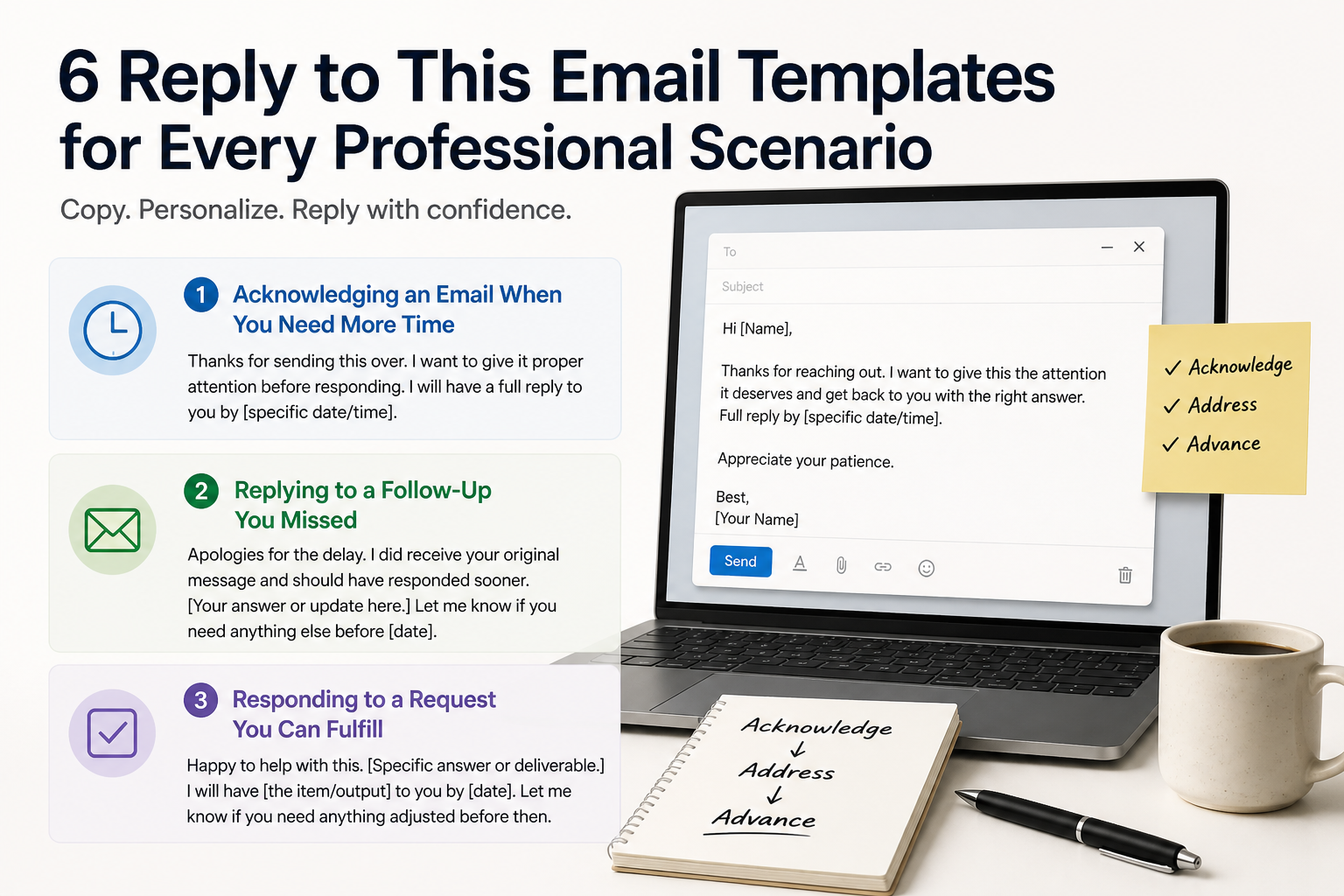
6 Reply to This Email Templates for Every Professional Scenario
These templates are ready to copy. Each one follows the acknowledge-address-advance structure. Swap the bracketed fields, add one specific detail, and send.
Template 1: Acknowledging an Email When You Need More Time
Hi [Name],
Thanks for sending this over. I want to give it proper attention before responding. I will have a full reply to you by [specific date/time].
Appreciate your patience.
Use this when: You received an email that needs more thought than you can give it right now, and silence would create anxiety on the sender's end.
Template 2: Replying to a Follow-Up You Missed
Hi [Name],
Apologies for the delay. I did receive your original message and should have responded sooner. [Your answer or update here.] Let me know if you need anything else before [date].
Use this when: Someone sent a follow-up because you went quiet. Skip the elaborate excuse. Own the delay in one sentence and move forward.
Template 3: Responding to a Request You Can Fulfill
Hi [Name],
Happy to help with this. [Specific answer or deliverable.] I will have [the item/output] to you by [date]. Let me know if you need anything adjusted before then.
Use this when: Someone made a clear request and you can fulfill it. Confirm, deliver, set the next milestone.
If email is part of a broader content or outreach workflow, Indexly's AI writing engine drafts SEO-optimized articles at the same speed you reply to emails, without the manual keyword research or formatting work sitting between you and publish.
Template 4: Declining or Redirecting a Request Professionally
Hi [Name],
Thank you for thinking of me for this. I am not the right fit to help with [specific request] at this stage. [Name/department] would be better placed to assist. I am copying them here.
Use this when: You need to say no or redirect without burning the relationship. Always give the sender a clear next move.
Template 5: Replying to a Cold Outreach or Vendor Email
Hi [Name],
Thanks for reaching out. This is not something I am pursuing right now. If that changes, I will follow up directly.
Use this when: A vendor or cold contact has emailed you. A clean, short decline is more professional than silence and costs you ten seconds.
Template 6: Closing an Email Thread That Has Gone Too Long
Hi [Name],
Great, I think we have covered everything we need here. I will [summarize next action in one sentence]. No need to reply unless something changes on your end.
Use this when: A thread has circled back on itself and needs a clean close. Modern email platforms now thread follow-up replies into existing conversations automatically, which helps with context. But a thread that has no clear close still confuses the humans reading it. Closing cleanly is still your job.
How to Reply to This Email Faster Without Sounding Like AI Slop
Templates work. But a template pasted without any editing is AI slop: technically correct, obviously not written by a person who actually read the email. Two editing moves fix that.
Specificity Injection: Add One Detail Only You Would Know
After you paste a template, add one sentence that references something specific to that email. The sender's exact phrase. The project name. The deadline they mentioned. One detail signals that you read it, not that you ran it through a tool. This is the difference between a response that builds trust and one that reads like an auto-reply.
Tone calibration works the same way. If the sender wrote in short, direct sentences, match that. If they wrote warmly, reflect some warmth back. Do not mirror their mistakes, like a grammar error or an overly casual opener, but do match the energy level.
Tone Calibration: Matching the Sender's Register Without Mirroring Their Mistakes
Read the sender's email once before you draft. Note the length, the opener, and whether they used contractions. Your reply should sit in the same register. A sender who writes "Hey, quick question" does not want a reply that opens with "Dear [Name], I am writing in response to your inquiry."
One edit pass after pasting a template is all it takes. Specificity plus tone calibration makes the template invisible.
When Not to Reply and What to Do Instead
Sometimes the right move is not to reply at all, or to reply much more narrowly than the email suggests.
The Legal Risk of Replying-All With Outside Parties on the Thread
When clients or opposing parties are copied on an email chain, a reply-all sends your response to everyone. Legal ethics guidance is clear on this: copying a client on a message to opposing counsel creates a risk that opposing counsel replies directly to your client, bypassing you. The safer move is to reply to counsel alone and loop your client in separately. This applies beyond legal work to any situation where an outside party is on a chain that was not intended for them.
Adding a New Person to an Existing Thread: Reframe the Subject Line First
When you add a new participant to an existing thread, do not drop them into a chain of 40 messages with no context. Delete the thread, summarize the situation in one sentence, and change the subject line to signal it is a new conversation. One sentence of setup is a professional courtesy that saves everyone time.
When a Phone Call or Slack Message Beats Any Email Reply
If a thread has gone four rounds with no resolution, email is the wrong tool. A three-minute call closes more loops than three more email replies. The same applies when the message is time-sensitive, emotionally charged, or needs clarification that would take five back-and-forth messages to resolve in writing.
Frequently Asked Questions
What is the best way to reply to a professional email?
Use the acknowledge-address-advance structure. Confirm receipt, answer the specific ask directly in the first sentence, and state the next step or expected timeline. Keep the reply to the sender unless others genuinely need the information.
How do you politely reply to an email when you need more time?
Send a short acknowledgment within 24 hours. Confirm you received the message, name the specific request, and give a concrete date for your full response. Vague replies like "I will get back to you soon" create more uncertainty than they resolve.
Should you reply to all on a group email?
Only if every person on the thread needs your response. If your answer is relevant to one person, reply to that person only. Unnecessary reply-all messages waste time and signal poor judgment. Some teams have disabled the feature entirely for this reason.
How do you end a reply email professionally?
State the next action clearly before your sign-off. Name who owns the next step and by when. Avoid filler closings like "let me know if you have any questions" unless you mean it. A clean close reduces the chance of another unnecessary reply.
Is it okay to use AI to write email replies?
Yes, with one edit pass. AI-generated email replies become a problem when they go out unedited and unspecific. Add one detail from the original email and match the sender's tone register. That single edit makes the reply feel human and makes the AI assist invisible.
Start With the Email That Has Been Sitting Longest
You now have the acknowledge-address-advance structure, six templates matched to specific scenarios, and two editing moves that stop your replies from feeling generic. The only step left is opening your inbox.
Pick the email that has been sitting unanswered the longest. Decide if it is a Template 1 situation (you need more time) or a Template 2 situation (you missed a follow-up). Paste, inject one specific detail, match the tone, and send. Speed matters. So does not sounding automated. The editing moves in section four are the difference between a reply that builds trust and one that gets deleted.
If writing at scale is part of your workflow, not just email replies but SEO content, landing pages, or campaign copy, see how Indexly handles research, writing, and publishing automatically so you stop context-switching between tools.
Frequently Asked Questions
What is the best way to reply to a professional email?
The best way to reply to a professional email is to respond promptly, use a clear subject line, address the sender by name, keep your message concise and on-topic, and end with a clear call to action or next step.
How do you reply to an email professionally?
To reply professionally, start with a polite greeting, acknowledge the original message, provide a clear and helpful response, use proper grammar and tone, and close with a courteous sign-off such as 'Best regards' or 'Sincerely'.
How quickly should you reply to an email?
Ideally, you should reply to professional emails within 24 to 48 hours. For urgent matters, aim to respond within a few hours. If you need more time to gather information, send a brief acknowledgment letting the sender know when they can expect a full reply.
What should you include when replying to an email?
When replying to an email, include a greeting, a reference to the original message or context, your main response or answer, any relevant details or attachments, and a closing line with your name and contact information if appropriate.
What are common mistakes to avoid when replying to emails?
Common mistakes to avoid include replying too late, using an unprofessional tone, forgetting to answer all questions in the original email, using Reply All unnecessarily, writing overly long responses, and failing to proofread before sending.